 Timecard
 Pastely


MRR and Churn Alerts for SaaS Founders, on iPhone
Churn doesn't send a notification. Spikely does.
Most billing dashboards show you what happened once you go and look. Spikely reads the same numbers with a read-only key, works out what is usual for your business, and tells you when subscriptions or churn stop looking like themselves.

16, usually 31 to 57. 64% below usual.
 VercelA deploy changed the pricing page
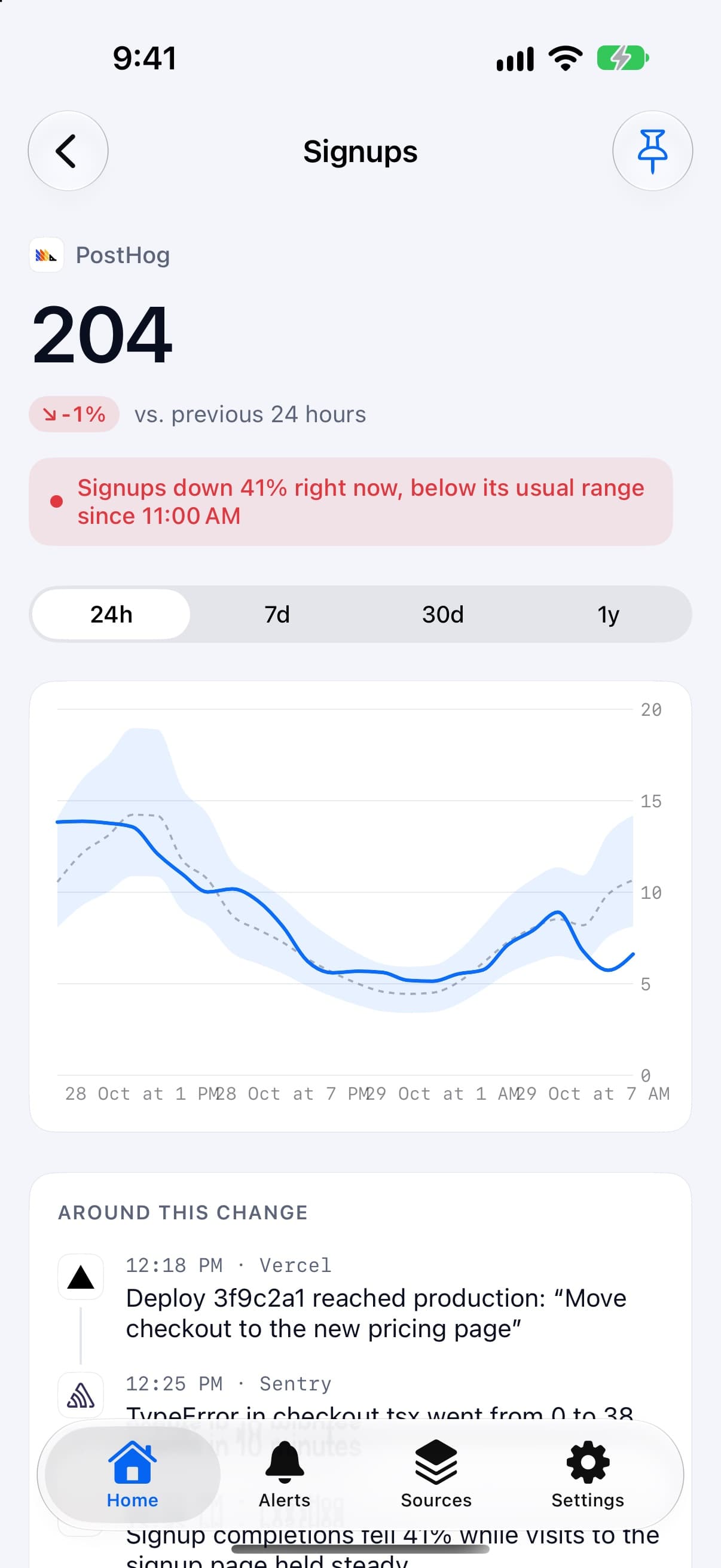
 PostHogCheckout completions fell after that deploy
 StripeNew subscriptions fell below their usual range
The short answer
SaaS founders use Spikely to get an iPhone alert when MRR, new subscriptions or churn leave their usual range. It connects to Stripe, Paddle, Polar, Lemon Squeezy and Dodo Payments with read-only keys, and shows what your other tools recorded around the move.
 Written by Prince Ajuzie, who builds Spikely.
Updated
- Connects to

 and 15 more
- Access
- Read-only keys
- Runs on
- iPhone, iPad, Mac, Apple Watch
- Price
- $9.99 a month or $79.99 a year, 3 days free on yearly
Why revenue problems stay hidden
A slow leak looks like a normal day
A cancellation or two doesn't stand out on a monthly chart. You tend to see the pattern when the month closes, after the money is gone.
Good news goes unnoticed too
A jump in new subscriptions usually has a cause you would want to act on, like a mention or a post that is working. That moment passes quickly.
The cause is rarely in the billing tool
Stripe can tell you subscriptions fell. It can't tell you about the deploy that changed the pricing page an hour earlier.

How Spikely watches subscription revenue
Reads your billing tool, read-only
Each source shows where to create a key with the narrowest scope available. Spikely can read the numbers but can't change anything in your account.
Flags moves in both directions
Falling subscriptions and sudden growth both get an alert, because both are worth knowing about the same day.
Rules for the lines you care about
Add your own rules on top, such as when MRR falls by a set amount or rises above a number. Mark one urgent and it can reach you during quiet hours.
Why shows what was recorded
The Why view lists what your other sources recorded before the move began. It doesn't use AI to guess at causes it can't see.
Which numbers to watch and what a break usually means.
| Number | Read from | What a break usually means |
|---|---|---|
| MRR | Stripe | Upgrades, downgrades or cancellations outside your usual pace |
| Churn | Paddle | A pricing or product change, or a group of renewals failing |
| New subscriptions | Polar | A checkout problem if they fall, a new channel if they rise |
| Activation events | PostHog | New users stuck before the point where they start paying |
These are common readings, not diagnoses. Spikely shows what moved and what your tools recorded, and you decide what it means.
How to set it up
Install Spikely
Get it from the App Store. You can look around first, and signing in turns on alerts.
Connect Stripe
Add a key with the narrowest access available, using our Stripe key guide. Then add your other tools the same way.
Choose a sensitivity
Big moves only, Balanced or Every move. Add your own rules for any line you care about.
When Spikely is the wrong tool.
You need revenue reporting
Spikely isn't a replacement for a subscription analytics or finance tool. It won't produce cohort reports or board metrics.
You want failed payments recovered
Spikely only reads your numbers. It can't retry a card, email a customer or change a subscription.
Questions, answered plainly.
Yes. It flags MRR when it leaves its usual range, and you can add your own rule for a specific line, such as falling by a set amount. A rule marked urgent can break through quiet hours.
Stripe, Lemon Squeezy, Polar, Dodo Payments, Paddle and RevenueCat. Spikely uses a read-only or narrowly scoped key for each one.
It asks for a restricted key with read-only permissions, so it can read figures but can't charge, refund or edit anything. Keys are encrypted in your iPhone's Keychain.
Stop checking. Start hearing about it.
Spikely learns what normal looks like for every number your startup runs on, and tells you when one breaks pattern, with what changed around it.
3 days free on yearly · iPhone, iPad, Mac and Apple Watch
More use cases
Every number you own, watched for you, with one alert when something breaks pattern.
Downloads, ratings, trials and crashes in one place, with an alert when a release goes sideways.
One project per startup, with separate keys, even for two accounts of the same tool.
The 24 hours after you post, in the Dynamic Island, with a count of what needs you.
Free tools for this
See your ARR, when you'll hit your target, and the ceiling your churn is quietly setting.
Work out customer, gross and net revenue churn, what it means over a year, and how long customers stay.
Check whether each customer is worth what you pay to win them, and how fast you earn it back.