 Timecard
 Pastely


Catch a Bad Deploy by Its Effect on Signups and Errors
The deploy went green. Signups went the other way.
CI checks that the code runs. It doesn't check that people can still finish signing up. Spikely watches the numbers that come after the deploy and puts them next to the deploy itself.

70, usually 102 to 146. 44% below usual.
 VercelDeploy 3f9c2a1 reached production
 SentryTypeError in checkout.tsx went from 0 to 38 an hour
 PostHogSignup completions fell while page visits held
The short answer
Spikely catches a bad deploy by watching its effect. When signups, revenue or errors leave their usual range, the alert lists what your sources recorded around that time, such as the Vercel deploy that reached production, the new Sentry error and the PostHog funnel drop.
 Written by Prince Ajuzie, who builds Spikely.
Updated
- Connects to
 and 15 more
- Access
- Read-only keys
- Runs on
- iPhone, iPad, Mac, Apple Watch
- Price
- $9.99 a month or $79.99 a year, 3 days free on yearly
Why bad deploys slip through
Passing tests isn't the same as working
A copy change or a pricing tweak can hurt conversion without throwing a single error.
The evidence is in three tools
The deploy is in your host, the error is in your tracker and the drop is in your analytics. Lining them up by hand takes time you don't have.
Some errors are quiet
If the page fails in a way your error tool doesn't catch, the only sign is that fewer people get through.
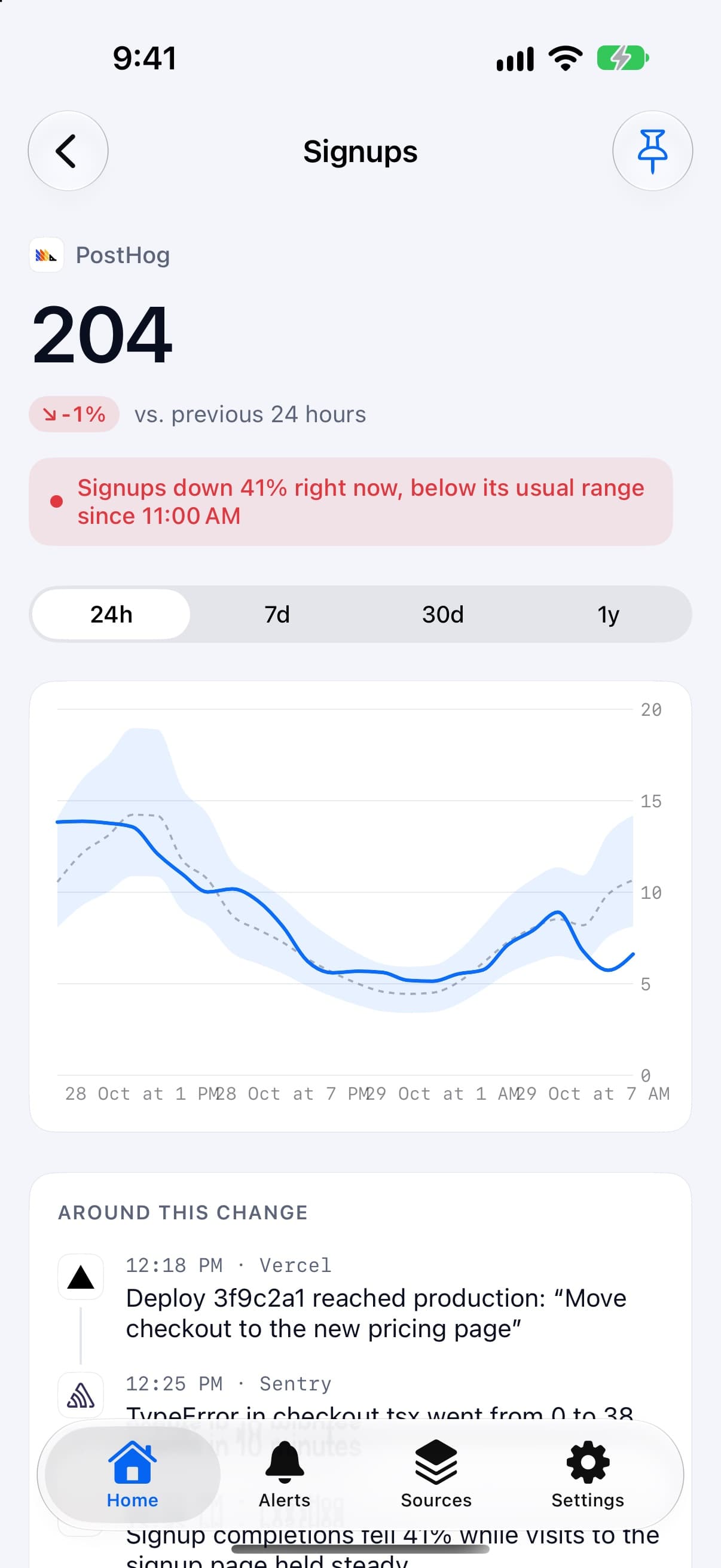
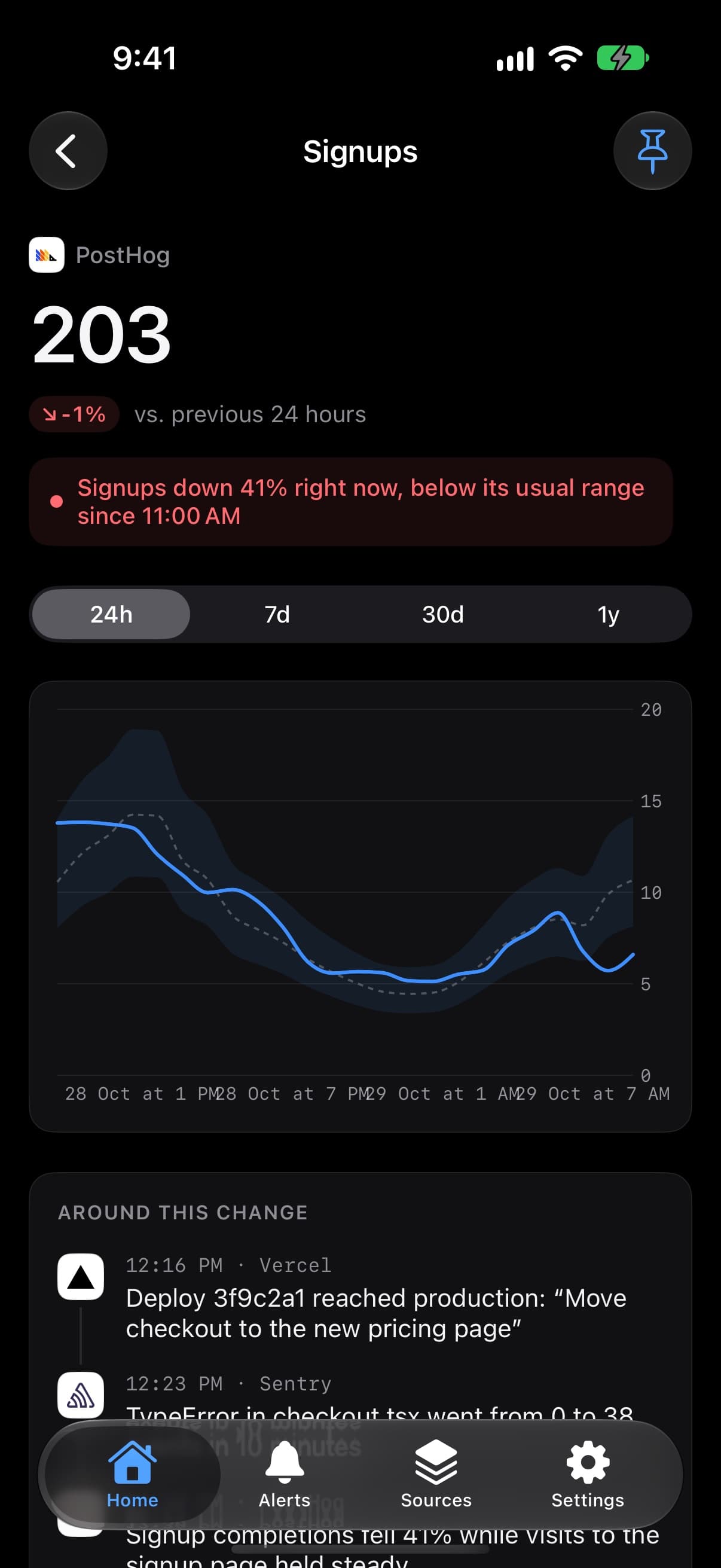

How Spikely connects a deploy to a drop
Watches the result
Signups, revenue and errors each have a usual range, so a move shows up whichever tool it starts in.
Reads your deploys
Vercel, Netlify and Cloudflare are sources, so a deploy going live is on the record when the alert opens.
Lines it up in order
Why lists what your sources recorded around the move, in time order, without you opening three tools.
Doesn't claim to know the cause
A deploy near a drop is evidence, not proof. Spikely shows what happened and leaves the conclusion to you.
Which numbers to watch and what a break usually means.
| Number | Read from | What a break usually means |
|---|---|---|
| Deployments | Vercel | The timestamp every other number gets read against |
| Deploys and failed deploys | Netlify | What reached production, and what didn't |
| Errors | Sentry | A new failure that wasn't there before the release |
| Signups and activation | PostHog | People failing to get through, even with no errors logged |
These are common readings, not diagnoses. Spikely shows what moved and what your tools recorded, and you decide what it means.
How to set it up
Install Spikely
Get it from the App Store. You can look around first, and signing in turns on alerts.
Connect Vercel
Add a key with the narrowest access available, using our Vercel key guide. Then add your other tools the same way.
Choose a sensitivity
Big moves only, Balanced or Every move. Add your own rules for any line you care about.
When Spikely is the wrong tool.
You want automatic rollbacks
Spikely has read-only access, so it can't touch your deployments. You make the call and do the rollback yourself.
You run an on-call team
There are no rotations or escalations. For that, use a paging tool such as PagerDuty alongside it.
Questions, answered plainly.
Compare signups with their usual range for that hour and day, and check what shipped just before the drop. Spikely does both when you connect a host such as Vercel and a source for signups such as PostHog.
No. Spikely reads Sentry's numbers and uses them for context. You still need Sentry to see stack traces and debug the error.
No. It only has read-only access to your tools, so it can't change anything.
Stop checking. Start hearing about it.
Spikely learns what normal looks like for every number your startup runs on, and tells you when one breaks pattern, with what changed around it.
3 days free on yearly · iPhone, iPad, Mac and Apple Watch
More use cases
The 24 hours after you post, in the Dynamic Island, with a count of what needs you.
An alert when revenue falls below its own usual range, with no fixed threshold to maintain.
An alert when visitors jump above their usual range, with the referrer if it was recorded.
Every number you own, watched for you, with one alert when something breaks pattern.
Free tools for this
What Stripe, Vercel, GitHub and more say about themselves right now, from their own status feeds.
Turn 99.9% into real downtime per month and year, and work out your actual uptime after an outage.
Paste any metric and see its usual range, what moved outside it, and by how much.